Step by Step Phishing Prevention: Your 2026 Defense Guide

Step by step phishing prevention is a systematic process of habits, tools, and response protocols that stop attackers from stealing credentials, money, or sensitive data through deceptive messages. The industry term for this discipline is anti-phishing defense, and it covers everything from how you read an email to how your organization recovers after a breach. This guide gives individuals and teams a concrete, ordered sequence they can apply today. You will find verification checklists, organizational controls, and a post-attack response plan built around tools like 1Password, Google Authenticator, and Google Safe Browsing.
What are the essential steps individuals can take to prevent phishing attacks?
The fastest individual defense against phishing is a three-part habit: slow down when a message creates urgency, verify every link before clicking, and never submit credentials through a link received in email or chat. That sequence alone eliminates the majority of successful phishing attempts, because most attacks depend on speed and panic to bypass your judgment.
Here is the full ordered sequence every individual should follow:
- Pause before reacting. Phishing messages manufacture urgency. “Your account will be suspended in 24 hours” is a pressure tactic, not a real deadline. Stop, breathe, and treat urgency as a red flag rather than a reason to act fast.
- Inspect the full sender address. Display names are trivially easy to fake. Click or tap the sender name to reveal the actual email address. A message from “PayPal Support” sent from "support@paypa1-billing.net` is a phishing attempt.
- Hover over or long-press every link. On desktop, hovering shows the real destination URL in the browser status bar. On mobile, long-pressing reveals the full link. If the URL does not match the organization’s official domain exactly, do not click.
- Never enter credentials via email links. Instead, type the official URL directly into your browser or open a saved bookmark. This single habit prevents credential theft even when you cannot identify a fake site visually.
- Use a password manager. Tools like 1Password and Bitwarden only autofill credentials on the exact registered domain. If you land on
paypa1-billing.net, your password manager stays silent. That silence is your warning. No human can consistently spot a one-character domain swap, but a password manager catches it every time. - Enable two-factor authentication (2FA). Google Authenticator, Authy, and hardware keys like YubiKey add a second barrier that a stolen password alone cannot bypass. Prioritize 2FA on email, banking, and any account with administrative access.
- Check suspicious URLs with a scanning tool. Google Safe Browsing, VirusTotal, and URLScan.io let you paste a link and check its reputation before visiting. This takes about 15 seconds and can prevent a catastrophic credential leak.
- Report and delete phishing messages. Use the “Report Phishing” button built into Gmail, Outlook, and Apple Mail. Reporting takes roughly 60 seconds but protects other users by feeding threat intelligence back to providers.
Pro Tip: Set up a dedicated bookmark folder for every site that holds sensitive data, including your bank, email provider, and work tools. Accessing accounts only through bookmarks removes the risk of mistyped or manipulated URLs entirely.
How can organizations implement step-by-step phishing prevention protocols for teams?

Organizations face a harder problem than individuals because one person’s mistake can compromise an entire network. A lifecycle approach of prevention, monitoring, and recovery that starts with high-impact assets like email and admin portals is the most effective organizational framework. Structure your controls in stages rather than deploying everything at once.
Prevention layer
- Train every team member to pause before opening urgent requests, unexpected invoice attachments, or document-sharing links from unfamiliar senders.
- Require verification of any request involving money transfers or credential resets through a second communication channel. A phone call to a known number confirms what an email cannot.
- Deploy mandatory MFA across all organizational accounts, prioritizing email, VPN, and cloud admin panels.
- Enable spam filtering and attachment scanning at the mail gateway level. Microsoft Defender for Office 365 and Google Workspace’s built-in protections catch a large share of known phishing domains before messages reach inboxes.
Monitoring and reporting layer
- Establish a no-blame reporting policy. Employees who fear punishment for clicking a phishing link will hide the incident, turning a recoverable mistake into a prolonged breach.
- Create a single internal channel, such as a dedicated Slack channel or email alias, where staff can forward suspicious messages for review without friction.
- Run phishing simulation exercises quarterly using platforms like KnowBe4 or Proofpoint Security Awareness Training. Simulations reveal which teams and individuals need additional coaching.
Recovery layer
- Document your incident response steps before you need them. A written runbook that covers who to call, what to isolate, and how to communicate reduces panic-driven errors during a real incident. The incident response readiness checklist from Makkari Security provides a solid starting template for teams building this out.
- Review and update your prevention controls after every simulation or real incident. Phishing tactics evolve monthly, and a checklist written in 2024 may miss techniques common in 2026.
Pro Tip: Assign a “phishing champion” in each department. This person receives slightly more advanced training, acts as the first point of contact for suspicious messages, and reports patterns to your security team. It distributes the defense workload without requiring every employee to become a security expert.
| Control layer | Key action |
|---|---|
| Prevention | Enforce MFA and train staff to verify urgent requests by phone |
| Detection | Deploy spam filtering and run quarterly phishing simulations |
| Reporting | Create a no-blame channel for flagging suspicious messages |
| Recovery | Maintain a written incident runbook and review it after every incident |
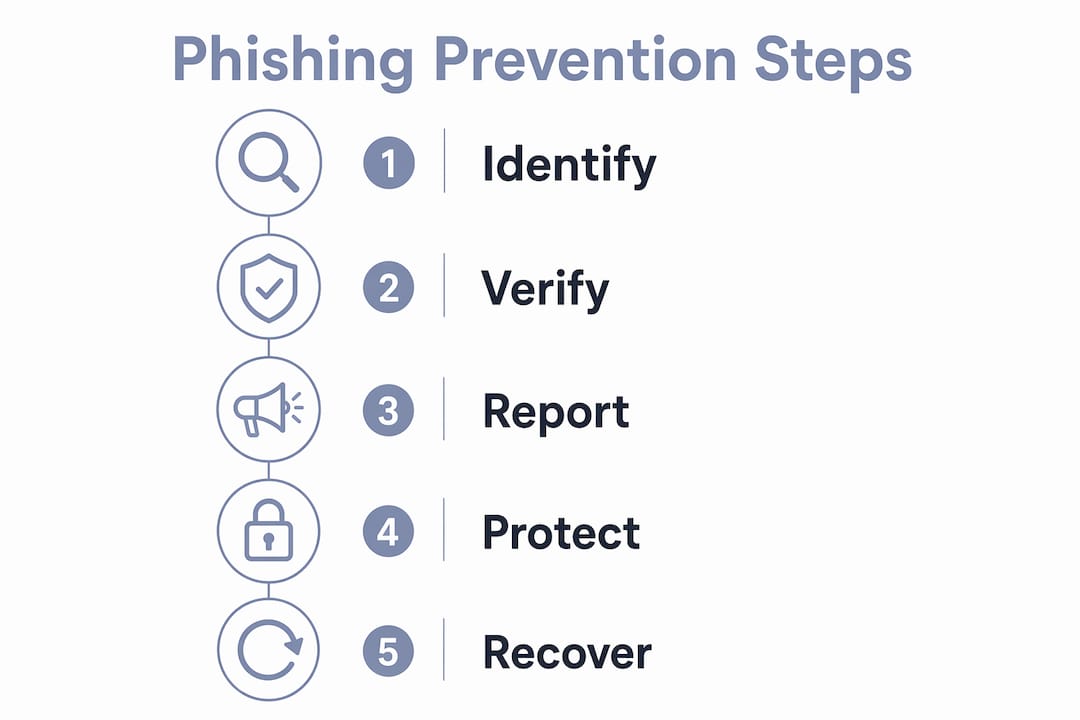
What should you do immediately after suspecting or confirming a phishing attack?
Automated credential stuffing begins within minutes of a successful phishing attack, so speed is the most important variable in damage control. The following steps apply whether you clicked a link, entered credentials, or simply suspect your account has been accessed.
- Close the phishing page immediately. Do not click anything else on the page. If you submitted data, assume it is already in the attacker’s hands.
- Change compromised passwords right now. Navigate to the official site by typing the URL manually or using a bookmark. Do not use any link from the suspicious message. Change the password for the compromised account first, then change it on any other account where you reused that password.
- Enable or reinforce 2FA. If 2FA was not active, turn it on immediately using Google Authenticator or a hardware key. If it was active, check whether the attacker has already added a new device to your authenticator list.
- Review account activity. Most platforms, including Google, Microsoft, and major banks, show a log of recent sign-ins. Look for logins from unfamiliar locations or devices and terminate those sessions.
- Contact your bank or financial institution. If the phishing attempt targeted payment credentials, call your bank’s fraud line directly. Card freezes and fraud alerts can be activated in minutes and prevent unauthorized transactions.
- Run a malware scan. If you downloaded an attachment or ran a file, scan your device with Malwarebytes or your organization’s endpoint protection tool. Some phishing attacks deliver keyloggers or remote access trojans alongside credential theft.
- Report the incident. Channel-aware reporting matters here. Email phishing goes to your provider’s report button and to the Anti-Phishing Working Group at reportphishing@apwg.org. Text-based phishing in the US gets forwarded to 7726 (SPAM). Social media phishing gets reported directly to the platform.
- Start using a password manager going forward. 1Password, Bitwarden, and Dashlane all offer free tiers. A password manager ensures you never reuse passwords and never autofill on a fake domain again.
Pro Tip: Screenshot the phishing message and URL before closing it. This documentation helps your IT team, your bank’s fraud department, and law enforcement identify the attack pattern and potentially trace the source.
How to effectively recognize phishing emails using a verification checklist
A six-check ordered routine is the most reliable method for identifying phishing before you click anything. Treat it as a threshold system: if two or more checks fail, treat the message as phishing regardless of how convincing it looks.
- Context check. Did you initiate this contact, or did the message arrive unsolicited? An invoice from a vendor you have never worked with, or a password reset you did not request, fails this check immediately.
- Sender domain check. Expand the sender field and read the full email address. Legitimate organizations send from their registered domain.
amazon-support@amazon-help.cois not Amazon. Look for extra words, hyphens in the domain, or country code extensions that do not match the brand. - Link preview check. Hover over every link in the message. The destination URL should match the sender’s official domain exactly. Mismatches, URL shorteners, or IP addresses instead of domain names all fail this check.
- Language and tone check. Phishing messages frequently contain spelling errors, awkward phrasing, or an unusually formal tone that does not match previous communications from the same sender. AI-generated phishing has reduced obvious grammar errors, so this check alone is no longer sufficient, but it still catches a significant share of attacks.
- Pressure tactics check. Phrases like “act now,” “your account will be closed,” or “verify immediately” are manipulation tools. Legitimate organizations give you time to respond and provide multiple contact options.
- Data request check. No legitimate service will ask you to confirm your full password, Social Security number, or credit card details via email. Any message requesting this data fails this check automatically.
For a deeper look at detecting phishing attempts with real-world examples and verification techniques, Thepitstop’s 2026 practical guide covers each of these checks with annotated screenshots and case studies.
Pro Tip: Print this six-check list and keep it near your workstation for the first two weeks. After that, the routine becomes automatic. The goal is to make verification a reflex, not a deliberate task.
Key takeaways
Effective phishing prevention requires a layered sequence of behavioral habits, technical controls, and a fast, structured response when an attack succeeds.
| Point | Details |
|---|---|
| Slow down on urgency | Treat every urgent message as a red flag and verify before acting. |
| Use a password manager | Tools like 1Password catch fake domains automatically when autofill stays silent. |
| Apply the six-check routine | Fail two or more checks and treat the message as phishing without exception. |
| Organizations need a lifecycle approach | Prevention, monitoring, and recovery controls must be staged and reviewed regularly. |
| Speed matters after an attack | Change passwords, enable 2FA, and contact your bank within minutes of exposure. |
Why I think most phishing training misses the point
Most phishing awareness programs focus on teaching people to spot bad emails. That is the wrong goal. The real goal is to build a verification reflex so automatic that it fires before conscious thought kicks in. I have watched organizations run annual phishing awareness training, pass their compliance checkbox, and then get breached six months later because the training never changed anyone’s daily behavior.
The uncomfortable truth is that technology alone cannot close the gap. Password managers and MFA are non-negotiable, but they protect you only when you actually use them consistently. The human layer is where most attacks succeed, and it is the layer that gets the least structured attention.
What actually works, in my experience, is making the safe behavior the path of least resistance. Bookmarks instead of email links. A password manager that fills credentials automatically. A no-blame reporting culture where clicking a phishing link is treated as useful data rather than a punishable offense. When security is easier than insecurity, adoption follows.
The organizations building social engineering defense workflows into their standard operating procedures are the ones that recover fastest from incidents. They are not necessarily the ones with the biggest security budgets. They are the ones that made verification a habit at every level of the team.
— Nicholas
Strengthen your phishing defense with Thepitstop
Knowing the steps is one thing. Testing whether your team actually follows them is another.
Thepitstop offers a free AI Agent Security Scan that evaluates your attack surface across both machine and human layers, including susceptibility to phishing and social engineering. For teams that want a formal credential, the SERA™ Certification is a professional assessment of social engineering resilience that gives individuals and organizations a measurable benchmark. Both tools are free to start and built specifically for the AI-driven environments where phishing threats are evolving fastest. If your team works with AI agents or autonomous systems, your human operators are the most targeted layer in your stack.
FAQ
What is the single most effective phishing prevention habit?
Never submit credentials through a link received in email or chat. Instead, type the official URL directly into your browser or use a saved bookmark, which eliminates the risk of fake domains entirely.
How does a password manager prevent phishing?
Password managers like 1Password and Bitwarden only autofill credentials on the exact registered domain. When you land on a fake site, the autofill stays silent, which is a reliable signal that something is wrong.
What should I do first after clicking a phishing link?
Close the page immediately, then change the compromised password by navigating manually to the official site. Speed is critical because credential stuffing starts within minutes of a successful attack.
How often should organizations run phishing simulations?
Quarterly simulations using platforms like KnowBe4 or Proofpoint Security Awareness Training give teams enough repetition to build habits without causing alert fatigue.
What is the six-check phishing recognition routine?
The six-check routine covers context, sender domain, link preview, language tone, pressure tactics, and data requests. Treat any message as phishing if two or more checks fail.