How to Detect Phishing Attacks: 2026 Practical Guide

Phishing is not getting simpler. Attackers are getting faster, more personal, and harder to spot. Knowing how to detect phishing attacks is now a skill every individual and organization needs, not just the IT department. 8.3 billion email-based threats were detected in Q1 2026 alone, and QR code phishing doubled in volume during the same period. This guide gives you the indicators, tools, step-by-step verification process, and real-world context to recognize phishing before it causes damage.
Table of Contents
- Key takeaways
- How to detect phishing attacks: the red flags that matter
- Tools and security practices for phishing detection
- Step-by-step process to analyze a suspected phishing message
- Common detection mistakes and how to avoid them
- My honest take on what actually works
- Take your phishing defense to the next level with Thepitstop
- FAQ
Key takeaways
| Point | Details |
|---|---|
| Red flags are predictable | Most phishing messages share specific signs: urgency, mismatched domains, and generic greetings. |
| Technical tools aren’t enough alone | DMARC, SPF, and DKIM reduce spoofing risk, but human awareness closes the gap they leave. |
| Verification breaks the attack | Contacting organizations through official channels stops phishing cold before any damage occurs. |
| Simulation training cuts click rates | Organizations that run regular phishing simulations reduce click rates by 86% within 12 months. |
| QR codes are the new attack vector | Treat unsolicited QR codes with the same skepticism you apply to suspicious email links. |
How to detect phishing attacks: the red flags that matter
Most phishing messages share a set of predictable characteristics. Once you know what to look for, spotting them becomes faster and more reliable.
Urgency and alarming language sit at the top of the list. Phrases like “Your account will be closed in 24 hours” or “Immediate action required” are designed to short-circuit your judgment. Legitimate organizations rarely demand split-second decisions via email.
Generic greetings are another reliable signal. Phishing emails typically open with “Dear Customer” or “Hello User” because attackers send millions of messages at once and cannot personalize them all. A real bank or service provider already knows your name and uses it. Watch for mismatched sender domains alongside generic greetings: the display name might say “PayPal Support” while the actual sending address reads something like support@paypa1-secure.net. Urgency, generic greetings, and mismatched domains are among the most consistent phishing scam signs across 2026 campaigns.
Link destination mismatches are easy to check and frequently overlooked. Hover your mouse over any link before clicking. The actual URL displayed in the bottom of your browser should match the brand being referenced. If it does not match, treat the message as suspicious. On mobile, press and hold a link to preview the destination URL before tapping.

Poor grammar and unusual phrasing remain common in phishing messages, though AI-generated phishing has improved the surface quality of many attacks. A message that reads awkwardly, uses unusual capitalization, or includes formatting inconsistencies still warrants close attention.
QR code phishing is the newest high-volume tactic worth calling out specifically. Attackers embed malicious URLs inside QR codes knowing that most people scan without previewing the destination first. QR code phishing doubled in volume in Q1 2026. Always use a QR scanner app that previews the full URL before opening, and apply the same skepticism you would to a suspicious link.
Pro Tip: Before clicking any link in an email, copy the URL and paste it into a text editor first. This lets you inspect the actual destination without any risk of accidentally loading a malicious page.
For a deeper look at 2026 phishing tactics, Thepitstop maintains an updated defense guide built specifically for teams working in AI-driven environments.
Tools and security practices for phishing detection
Recognizing phishing visually is one layer of defense. Setting up the right technical controls underneath creates a second layer that catches what the eye misses.
Email authentication: DMARC, SPF, and DKIM
Most successful phishing attacks use sender impersonation via domain spoofing. SPF, DKIM, and DMARC in combination are the technical answer to that threat. However, they work differently and have specific limitations you should understand.
SPF verifies that an email originated from an authorized mail server, but it only checks the envelope sender, not the visible “From” header. SPF alone cannot block visible domain spoofing because attackers can spoof the header you actually see while SPF still passes. DKIM adds a cryptographic signature that verifies message integrity, but it also does not protect the visible From header by itself.
DMARC is what ties both together. It aligns the From header with SPF and DKIM results and tells receiving mail servers what to do when authentication fails. The critical detail here: DMARC set to p=none is monitoring only and blocks nothing. Organizations must move to p=quarantine and then p=reject to actually stop spoofed emails from reaching inboxes. That transition typically requires a 2 to 4 week monitoring phase to identify all legitimate sending sources before enforcement. DMARC aggregate reports give you visibility into every source sending email on your domain, which makes it easier to spot unauthorized senders early.
For organizations looking for more depth on real-time email monitoring, pairing DMARC enforcement with active monitoring closes gaps that static configurations miss.
Security tools comparison
| Tool or Practice | What it does | Limitation |
|---|---|---|
| SPF | Validates authorized sending servers | Does not protect the visible From header |
| DKIM | Cryptographic signature on message content | Does not enforce From header alignment |
| DMARC (p=reject) | Aligns SPF/DKIM with From header; blocks spoofing | Requires monitoring phase before enforcement |
| Spam filters | Catches known malicious patterns | Misses novel or targeted attacks |
| Phishing simulation training | Reduces click rates through repeated exposure | Only works with consistent, varied campaigns |
Pro Tip: If your organization is still running DMARC at p=none, you are not protected from spoofing. Schedule the move to p=reject within 9 to 12 weeks and use the monitoring phase to map every legitimate email source first.
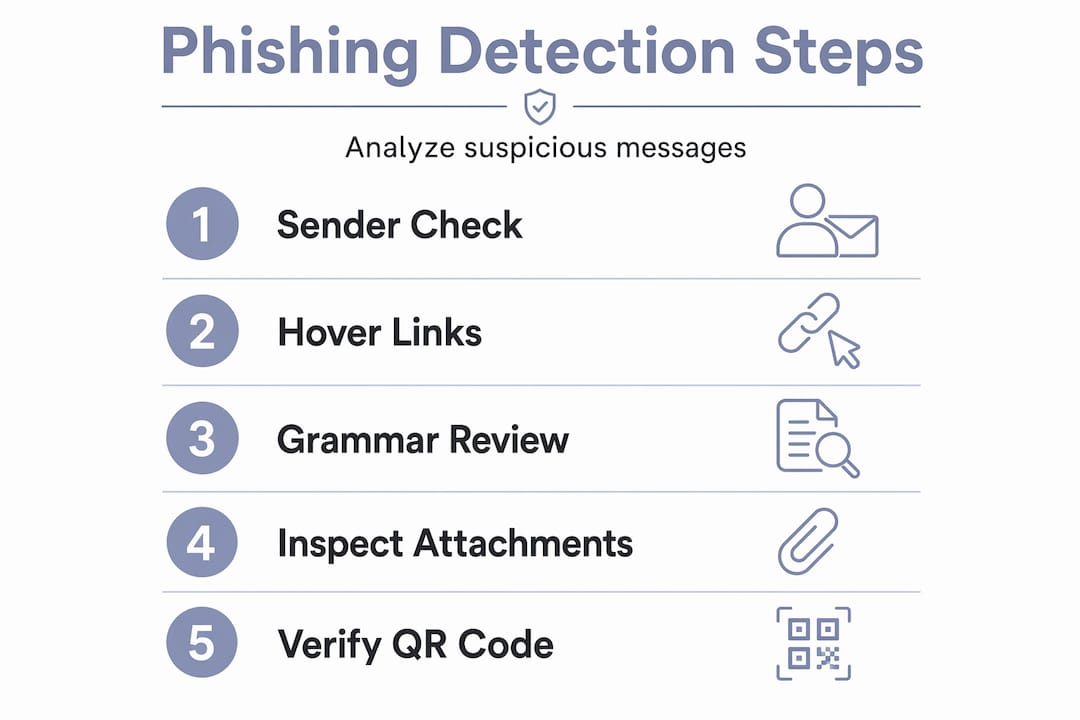
Step-by-step process to analyze a suspected phishing message
When a suspicious message lands in your inbox, a structured process matters more than instinct. Here is how to work through it without putting yourself at risk.
-
Check sender details. Look at the full email address, not just the display name. Confirm the sending domain matches the organization it claims to represent. Watch for subtle substitutions like “rn” instead of “m” or number-for-letter swaps.
-
Inspect links without clicking. Hover over links on desktop or press-hold on mobile to preview the destination URL. Confirm it matches the brand or organization in the message. Mismatches are a strong indicator of a phishing attempt.
-
Review message content for red flags. Look for urgency, generic greetings, poor grammar, unusual formatting, and requests for credentials or payment. Legitimate organizations do not ask for passwords via email.
-
Analyze email headers. Most email clients let you view the full headers of a message. Look at the “Received” field chain to trace the actual origin of the email. A mismatch between claimed and actual sending infrastructure is a strong confirmation of spoofing.
-
Verify through an independent channel. Contact the organization directly using phone numbers or web addresses you find independently, not from within the suspicious message. This single step stops the vast majority of phishing attacks cold.
-
Report the message. If you confirm it is phishing, report it to your IT security team, your email provider, or through official government reporting channels. Reporting helps protect others who may receive the same message.
| Step | Action | Purpose |
|---|---|---|
| 1 | Check full sender address | Catch display name spoofing |
| 2 | Hover/preview links | Reveal hidden malicious URLs |
| 3 | Read content critically | Spot urgency and credential requests |
| 4 | Inspect email headers | Confirm actual sending origin |
| 5 | Verify via independent channel | Confirm legitimacy without using suspect info |
| 6 | Report confirmed phishing | Alert others and support threat intelligence |
Common detection mistakes and how to avoid them
Even people who understand the basics make these errors. Knowing where detection breaks down helps you stay sharp.
-
Missing subtle domain changes. Attackers register domains like “arnazon.com” or “paypa1.com” that read correctly at a glance. Always read the full domain character by character when something feels off, rather than scanning it visually.
-
Dismissing QR code risk. Most users apply zero scrutiny to QR codes compared to email links. Treat any unsolicited QR code in email, printed materials, or messaging apps as a potential threat until you can verify the destination.
-
Ignoring urgency as a signal. When a message creates pressure to act immediately, that pressure itself is a warning sign. Slowing down in that moment is the correct response, not speeding up.
-
Confusing legitimate automated alerts for phishing. Password reset emails and transaction alerts are also common phishing templates. When in doubt, do not click the link in the email. Go directly to the service’s website and log in from there.
-
Relying on incomplete email authentication. SPF and DKIM without DMARC leave the visible From header unprotected. An organization that has deployed only SPF may still be impersonated in a way that end users cannot detect.
-
Skipping simulation training. Reading about phishing is not the same as being tested by it. Organizations that run regular phishing simulations see measurably lower click rates than those relying on awareness content alone.
Pro Tip: After any phishing simulation campaign, review which message types fooled the most people. Those specific patterns reveal your team’s actual blind spots and should drive the next training cycle.
My honest take on what actually works
I’ve spent years watching organizations invest in technical controls and still get compromised. The pattern is almost always the same. The tools were solid. The policies existed. The training happened once, at onboarding, and then never again.
What I’ve learned is that phishing defense is a behavior problem as much as a technology problem. Attackers adapt their messaging, their impersonation targets, and their delivery methods faster than most security policies update. The technical layer, DMARC enforcement, spam filtering, header inspection, is table stakes. You need it in place. But it won’t save a user who gets a well-crafted spear phishing message that makes it through anyway.
The organizations that actually reduce their incident rates are the ones treating human resilience as a metric. They measure click rates, they run quarterly simulations, and they change the content based on what worked against their own people. Continuous simulation training produces an 86% reduction in click rates over 12 months. That number is not theoretical. It reflects behavior change that compounds over time.
What I tell people who ask where to start: learn to recognize the pattern of the attack before worrying about the technical stack. The verification step alone, going directly to the official source instead of using the email’s contact information, would stop most successful phishing attempts. It sounds almost too simple. That’s exactly why it works.
— Nicholas
Take your phishing defense to the next level with Thepitstop
Education gets you started. Tested defenses keep you protected.
Thepitstop offers free tools designed to measure exactly how resilient your team and systems are against phishing and social engineering. The SERA™ Certification gives individuals and organizations a structured, tested credential for social engineering resilience, built around real attack simulations rather than checkbox training. For AI teams and operators, the free AI Agent Security Scan assesses your full attack surface, including human operator vulnerability to phishing attempts. If you want the broader picture on AI-related liability and phishing risk, the AI Agent Liability Gap white paper covers the emerging accountability landscape in detail. Thepitstop makes these tools accessible at no cost because the threat is real and the gap in most organizations’ defenses is measurable.
FAQ
What are the most reliable signs of a phishing email?
The strongest phishing scam signs are urgency, generic greetings, mismatched sender domains, and links that don’t match the displayed brand. Any single one of these warrants closer inspection before you take any action.
How does DMARC help with detecting phishing emails?
DMARC aligns SPF and DKIM authentication with the visible From header, blocking spoofed emails from reaching inboxes when set to p=reject. Without DMARC enforcement, attackers can impersonate your domain in ways that bypass SPF and DKIM alone.
What is the safest way to verify a suspicious message?
The safest approach is to contact the organization using a phone number or website address you find independently. Never use contact information included in the suspicious message, as it may route you directly to the attacker.
Why should organizations test for phishing with simulations?
Regular phishing simulations expose the specific message types that fool your team, and continuous training reduces employee click rates by up to 86% within 12 months. Testing reveals real behavior under pressure, which static training content cannot replicate.
Is QR code phishing as dangerous as email phishing?
QR code phishing is growing fast and carries the same risks as malicious email links, often with less scrutiny from users. Always preview the destination URL with a QR scanner app before opening any link, especially from unsolicited sources.