Build a social engineering defense workflow for AI teams

Imagine this: a developer on your AI team gets a convincing Slack message from what appears to be a senior engineer, asking them to share credentials for a language model (LLM) API gateway. Within 48 hours, your proprietary training data is exfiltrated and your production agent is feeding manipulated outputs to downstream systems. One interaction. Catastrophic results. Social engineering remains the most reliable way attackers breach organizations, and for teams running AI deployments, the blast radius of a single successful attack is far larger than most security plans account for. This article walks you through a structured, evidence-based workflow to prevent exactly that scenario.
Table of Contents
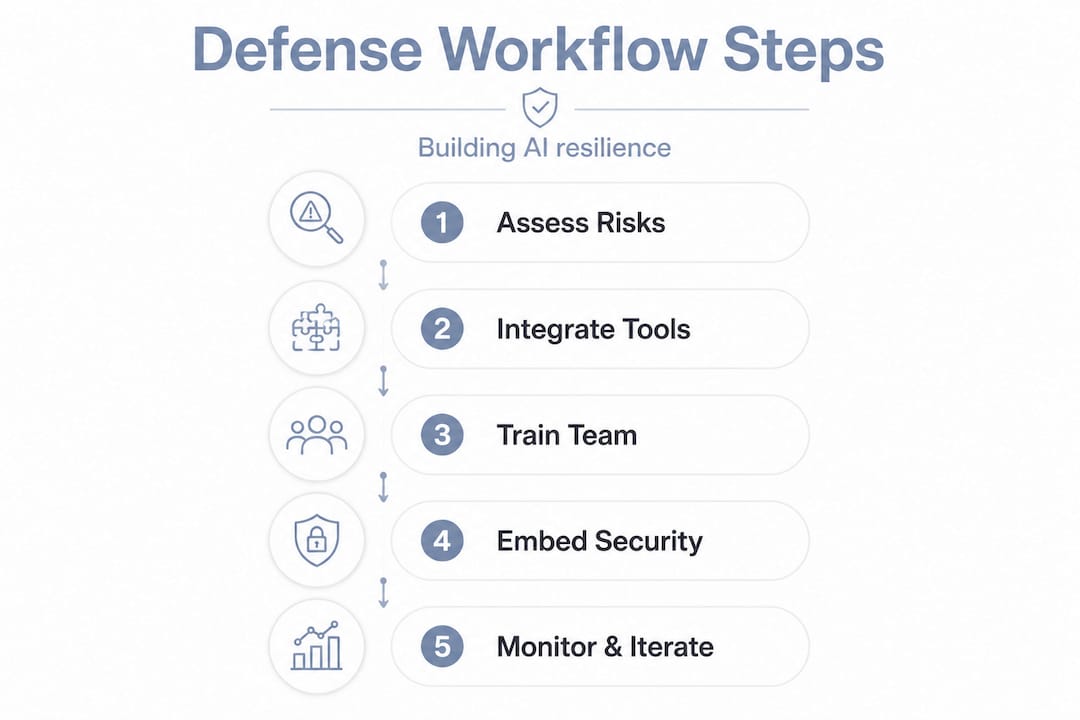
- Assess your social engineering risks and team readiness
- Select and integrate tools for automated detection and response
- Design layered training and simulation workflows
- Embed social engineering defense into AI/LLM development workflows
- Verify, monitor, and iterate your workflow for real-world resilience
- Why most social engineering workflows fail—and how yours can succeed
- How The Pitstop can strengthen your social engineering defense
- Frequently asked questions
Key Takeaways
| Point | Details |
|---|---|
| Map risks and readiness | Understanding your organization’s workflow vulnerabilities is crucial to build strong social engineering defenses. |
| Integrate automation tools | Selecting and configuring endpoint and email security solutions blocks the majority of attacks and enhances your response. |
| Prioritize continuous training | Ongoing, adaptive security awareness training and simulation dramatically reduce human error rates. |
| Embed defense into AI dev | Building social engineering prevention into AI pipelines closes high-risk gaps attackers often exploit. |
| Monitor and improve frequently | Routine workflow reviews and data-driven updates are essential to stay ahead of evolving threats. |
Assess your social engineering risks and team readiness
Every strong defense starts with knowing what you’re defending and where the gaps actually are. Before you buy a tool or run a training session, you need a clear picture of your exposure.
Start by reviewing recent incidents, near-misses, and your current threat intelligence feeds. Look specifically at where your AI and human workflows intersect because those junctions are prime targets. An AI agent that automatically executes instructions from a human operator, for example, creates a trust relationship that attackers will probe relentlessly. That intersection is what we call the AI agent liability gap, and it’s frequently underestimated in standard risk assessments.
Where to focus your readiness assessment:
- Map every point where humans issue commands to AI agents or vice versa
- Review access controls on model APIs, data pipelines, and orchestration layers
- Audit logging practices to determine what gets captured when an agent acts on manipulated input
- Survey your team’s familiarity with current social engineering techniques, including pretexting, spear phishing, and LLM prompt injections
- Check regulatory requirements such as NIST AI RMF, EU AI Act, or SOC 2 that mandate specific controls
Use the MITRE ATT&CK framework as your threat map. ATT&CK v19 covers social engineering across Initial Access (TA0001) and Reconnaissance (T1598 Phishing for Information), with expanded coverage specific to AI and social engineering scenarios added in the latest version. This gives you attacker technique coverage you can map directly to your controls.
“If you cannot map an attack technique to a specific control or detection capability you own, you have a gap. MITRE gives you the language to name it.”
Comparison: ad hoc assessment vs. structured assessment
| Assessment type | Coverage | Time to complete | Output quality |
|---|---|---|---|
| Ad hoc / reactive | Partial, incident-driven | Varies | Low |
| Structured (MITRE-mapped) | Systematic, technique-level | 2 to 4 weeks | High |
| Continuous automated | Real-time, behavioral | Ongoing | Very high |
Pro Tip: Use the website security checklist as a quick sanity check against your external-facing AI assets before diving into deeper internal assessments. It surfaces low-hanging fruit fast.
Your readiness assessment should also examine your AI agent security posture at the platform level. Tool configurations, API authentication settings, and agent permission scopes all affect how far an attacker can move once they’ve socially engineered one person into making a mistake.

Select and integrate tools for automated detection and response
Assessment gives you the map. Tools give you the terrain sensors. Choosing the right detection and response stack is not about buying the most expensive product. It’s about matching the right tool to the right attack surface and making sure everything feeds into a unified view.
Core tools for social engineering defense in AI environments:
- OSSEC: Open-source host-based intrusion detection that monitors file integrity, logs, and rootkit behavior across endpoints
- Sysmon: Windows system monitoring that captures process creation, network connections, and file writes, giving defenders granular visibility into what agents and operators are actually doing
- ClamAV and YARA: Malware detection and custom rule-based pattern matching, effective for catching novel payloads delivered through socially engineered vectors
- Rspamd: Advanced email filtering with machine-learning-based spam and phishing scoring
The numbers on these tools are worth understanding. Endpoint systems with OSSEC, ClamAV, YARA, and Sysmon block 97% of malicious samples in tested environments, while Rspamd achieves an F1-score of 0.959 on email filtering, which is near the top of the field. These are not theoretical benchmarks. They represent real-world performance that your team can reference when justifying tool investment to leadership.
Tool efficacy summary
| Tool | Function | Key metric |
|---|---|---|
| OSSEC | Host intrusion detection | Real-time log and file integrity monitoring |
| Sysmon | System activity logging | Granular process and network telemetry |
| ClamAV + YARA | Malware and pattern detection | 97% malicious sample block rate (combined) |
| Rspamd | Email filtering | F1-score 0.959 |
Integration is where most teams stumble. Individual tools collecting data in silos create blind spots. You need these feeding into a SIEM dashboard for endpoint monitoring where analysts can correlate events across endpoints, email gateways, and agent activity logs. That unified visibility is what separates reactive organizations from proactive ones.
Pro Tip: Reference the OWASP Top 10 mapping for LLMs when configuring detection rules for your AI-specific stack. Many social engineering attacks targeting LLM agents exploit OWASP-documented weaknesses like prompt injection and insecure output handling. Mapping your SIEM rules to these categories helps you catch AI-specific attack patterns that generic tools might miss.
You can also strengthen your external posture using guidance on essential web security features to close vulnerabilities that social engineers often exploit to establish credibility before targeting your team directly.
Design layered training and simulation workflows
Tools handle the machine side of defense. But a determined attacker will always look for the human path around your technical controls. That’s why training and simulation are not optional supplements. They are load-bearing walls in your defense structure.
The right way to build a continuous simulation workflow:
- Baseline your team. Run an initial phishing simulation to establish your starting phishing-prone percentage (PPP). Most organizations see 25 to 35% of users click on simulated phishing lures before any training.
- Launch immediate, bite-sized training. When users fail a simulation, trigger instant microlearning that explains exactly what they missed and why it matters in your specific AI context.
- Repeat at increasing sophistication. After 30 days, run a more advanced simulation targeting your AI developers specifically, using pretexting scenarios relevant to their roles.
- Extend to AI-specific scenarios. Simulate prompt injection attempts delivered through seemingly legitimate channels. Help your team recognize when an AI agent is being manipulated upstream.
- Gather feedback and adapt. Ask participants what made a simulation believable or not. Use that feedback to sharpen the next exercise.
The impact of this approach is significant. Phishing simulations reduce click rates by 86% over 12 months, dropping the baseline from 33.1% PPP to 4.1%. That same data shows a 40% reduction in just 90 days, which means you don’t have to wait a year to see meaningful improvement. Continuous training beats annual training on every metric.
Statistic to share with leadership: A team that starts at 33% phishing susceptibility can reach sub-5% in a year with consistent simulation and feedback. That’s not a marginal gain. It’s the difference between a breach and a blocked attempt.
Take your team through a free security awareness scan to get a current baseline, and use the phishing assessment quiz to identify specific knowledge gaps before you design your simulation program. Starting from data beats starting from assumptions.
Pro Tip: Don’t just simulate email phishing. AI teams face voice-based social engineering, fake collaboration tool messages, and manipulated code review requests. Build multi-channel simulations that reflect how your team actually communicates and works.
Embed social engineering defense into AI/LLM development workflows
The most overlooked opportunity in social engineering defense is the development lifecycle itself. Most teams treat security as a layer applied on top of a finished system. Attackers love that approach because it means the underlying architecture still contains exploitable assumptions.
Built-in defense principles for AI development:
- Least privilege for agents: Every AI agent should have the minimum data access and action scope required for its task. An agent that can only read from its assigned dataset cannot be weaponized to exfiltrate everything.
- Data lineage tracking: Know where every input to your model comes from, who authorized it, and when it entered the pipeline. Manipulated inputs from social engineering attacks become visible when lineage is audited.
- Automated input validation: Build checks that flag unusual instruction patterns before an agent executes them. This catches prompt injection attempts that come through socially engineered channels.
- Role-based access and feedback loops in CI/CD: Integrate security checkpoints into your continuous integration and deployment pipelines so that changes to agent behavior or permissions require explicit approval.
The UM-AISE (Unified Model for AI Social Engineering) framework maps attacker lifecycles specifically through AI systems, helping you identify at which development stage your current controls would fail. Integrating least privilege and data lineage alongside simulation-based testing and role-based feedback yields a measured 70% reduction in incidents and a 5x return on investment when applied holistically across the development lifecycle.
Comparison: bolted-on security vs. built-in security for AI agents
| Approach | When applied | Incident reduction | Developer friction |
|---|---|---|---|
| Bolted-on (post-deployment) | After release | Marginal | Low initially, high after breach |
| Built-in (lifecycle-integrated) | Design through deployment | Up to 70% | Moderate, decreasing over time |
Review the agent liability white paper for detailed guidance on where liability shifts when an AI agent acts on manipulated input. Understanding the legal and operational implications sharpens how you prioritize controls at each lifecycle stage.
Pro Tip: Use secure AI interview workflows as a reference when onboarding new developers to AI projects. Social engineering attacks often target newly onboarded team members who haven’t yet internalized your internal procedures.
Verify, monitor, and iterate your workflow for real-world resilience
Building a workflow is the beginning, not the end. The organizations that get breached after investing in security are usually the ones that set up defenses and then assumed the job was done. Adversaries adapt. Your workflow has to adapt with them.
Ongoing verification steps:
- Run quarterly red team exercises focused specifically on AI-specific social engineering scenarios, including prompt injection via human intermediaries.
- Review endpoint and SIEM logs monthly to spot behavioral drift, unusual agent activity, or upticks in phishing attempts that signal a shifting attack focus.
- Re-baseline phishing susceptibility every 90 days to track training effectiveness and catch teams that are backsliding.
- Schedule annual penetration tests that include social engineering components targeting both your human operators and your AI agents.
- Update detection rules in your SIEM and endpoint tools when new ATT&CK techniques are published. The threat landscape for AI environments specifically is evolving fast.
Your monitoring infrastructure should always report back to a real-time security monitoring dashboard that consolidates endpoint signals, email filtering results, and agent activity. That centralized view is what makes iteration data-driven rather than opinion-driven.
Workflow performance metrics to track
| Metric | Starting benchmark | Target after 12 months |
|---|---|---|
| Phishing click rate (PPP) | 25 to 33% | Below 5% |
| Malicious sample block rate | Varies | 97% (OSSEC/ClamAV/YARA/Sysmon stack) |
| Mean time to detect (MTTD) | Hours to days | Under 1 hour |
| Incidents per quarter | Baseline | 70% reduction |
“A defense workflow is not a project with a completion date. It is a practice with a review cycle. The moment you stop iterating, your adversary starts winning.”
Remember that the combined effect of training and endpoint controls is greater than either alone. Phishing resilience data confirms 86% click rate reduction is achievable, but only when training is paired with technical controls that catch what humans miss. Both layers must be monitored and improved together.
Why most social engineering workflows fail—and how yours can succeed
Here is the uncomfortable reality: most organizations have some version of a social engineering defense. They run a phishing test once a year. They have an AV solution. They wrote a security policy. And then they get breached anyway. The workflow is there on paper. The protection is not.
The failure almost always traces back to the same root cause: treating defense as a checkbox rather than a system. A one-time training session creates a one-time spike in awareness that decays within weeks. A static detection rule that was written for last year’s attack patterns will miss this year’s variants. Checklist-based compliance gives leadership a false sense of security while leaving real gaps untouched.
What’s different for AI teams specifically is that the human-agent interaction layer creates a new attack surface that traditional workflows were never designed to cover. An attacker doesn’t need to breach your AI system directly. They can socially engineer a developer into modifying a prompt template, or convince a vendor to alter an API response, and your agent will faithfully execute the manipulated instruction. Understanding the AI liability nuances around those scenarios is critical for building workflows that account for them.
The workflows that actually work share three traits. They are continuous, meaning simulations and monitoring never stop. They are feedback-driven, meaning every incident and every training result feeds back into a refining process. And they treat the human-AI boundary as a first-class attack surface, not an afterthought. Build your workflow as a living system, not a document, and you will be ahead of the vast majority of organizations running AI in production.
How The Pitstop can strengthen your social engineering defense
Building a resilient defense workflow requires the right combination of assessments, tooling, and ongoing validation. That’s exactly what we designed Thepitstop.ai to deliver for AI teams and cybersecurity professionals operating in autonomous environments.
Start with a free social engineering assessment to establish your team’s baseline resilience and identify where your human operators are most exposed. From there, our advanced SIEM dashboard gives you unified visibility across endpoints, email gateways, and AI agent activity so you can correlate threats in real time rather than piecing together alerts after the fact. And if you want to understand the deeper liability and architectural implications of your AI deployment, download our white paper for a detailed look at the gaps most organizations don’t discover until after a breach. Every tool we offer is built specifically for the AI-driven attack surface. No generic security theater.
Frequently asked questions
What is the most effective first step in building a social engineering defense workflow?
Begin with a comprehensive team and technical risk assessment, mapping exposures where humans and AI agents interact. MITRE ATT&CK v19 covers social engineering across Initial Access and Reconnaissance, giving you a structured framework to identify which techniques your current controls address and which they don’t.
How often should phishing simulations and security training be run?
Run simulations continuously rather than annually. Phishing simulations reduce click rates by 86% over 12 months only when training is consistent and feedback-driven, not when it’s treated as a one-time event.
Which tools block the most social engineering attack vectors?
Endpoint and email security tools like OSSEC, ClamAV, YARA, Sysmon, and Rspamd form the strongest combined stack. These systems collectively block 97% of malicious samples, with Rspamd achieving an F1-score of 0.959 for email filtering.
How can social engineering prevention be embedded into AI agent development?
Enforce least privilege and data lineage throughout the agent pipeline and simulate attacks at each lifecycle stage. Integrating the UM-AISE model maps attacker techniques to your development workflow so you can close gaps before deployment rather than after.
How do I measure if my workflow is working?
Track phishing susceptibility rates, endpoint block rates, mean time to detect, and incident frequency every quarter. Use red teaming and live monitoring dashboards to validate whether your controls are actually catching real-world attack attempts, not just theoretical ones.